Green screen : Using a green screen to help the audience engaged more by displaying a background of the actual studio. To be able to incorporate the blue screen into our video was a huge time saver and a convenient way to engage the audience in a creative way.
Colours and Sounds : Harvey was able to change the colours of my face and the background to make it seem like it was an old film by using black and white. Having the sense of being in the past we had to include the audience to understand that I went back in the past to make this video.Using imovie Harvey was able make our video more engaging but still exploring the importance and all past present and future technologies.
This is the day of submission and we are got our 6 minutes and 55 second video to 6 minutes and 5 seconds. It took a lot of cutting of transitions, speeding up the clips and as well as lowering the pitch of the sped up clips to make it sound a tiny bit more natural. We all have to stay back a bit and upload the video to all our youtube channels.
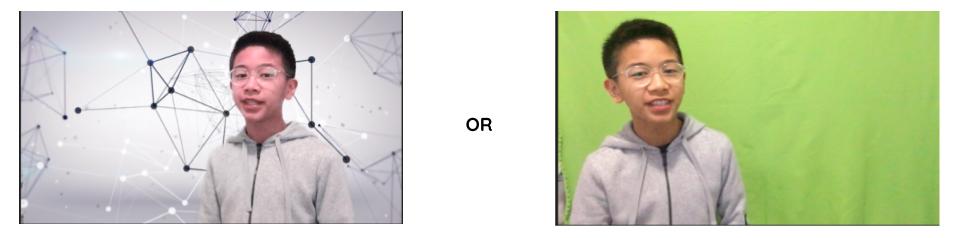
I had already filmed all of my content on the weekend of Week 1. I had filmed myself in front of a green screen which was a mistake. Filming in front of a green screen was one of the major error that was made in the process of production of the documentary. This is because, whilst I was editing I had encountered errors with the overall colour of my appearance in the video. Once I had layered the video content onto the green screen, I had appeared to slightly discoloured ( as seen in the photos )
This was one of the reasons why I decided to re-film my content. By choosing to re-film, I was able to avoid having to adjust the colour to a specific saturation, and light for each of my clips. This decision has impacted the documentary, as it provides a more current, and contemporary feel to this section of the documentary. This contemporary characteristic is essential, as this section of the documentary is about the present immersive technology.
Another reason why I chose to re-film my content, was because of the time limit (6-8 minutes). In a group of three, we would need at least 2.5 minutes each. But my total footage alone was 5 minutes long, which only left 3 minutes (maximum) for my two other group members. I decided to re-film the following week, and I was able to cut my total footage down by 1 minute, which allowed my group members to have at maximum, 2 minutes each. By re-filming, it was easier to edit and put together the whole documentary. If I had stuck to my old footage, I would’ve struggled to cut my time down, which would’ve caused me to take longer in the editing process.
Adding filters onto Shawn, and Oscar’s footage
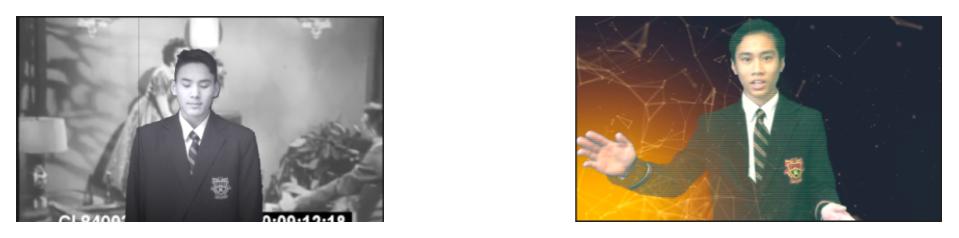
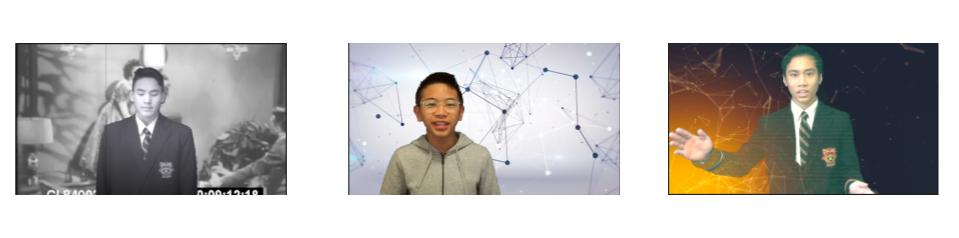
By adding filters to Shawn and Oscar (as seen in this image)
I was able to make Shawn’s content look as if he was filmed decades ago, which is the aim for the audience. To immerse them into the time period. In Shawn’s footage, I added a black and white filter to his footage. This makes him looks as if he truly was filmed in the past, since Shawn discusses the technology used in the past. In Oscar’s footage I utilised the hologram filter. This filter, makes Oscar appear as a hologram, which provides a futuristic feel and experience to the audience. These filters that I have added into their footage, will allow the viewers to be immersed into the time period being discussed by Oscar and Shawn (past & present)
Writing a script
I chose to create a script (https://docs.google.com/document/d/1zCpezRxL6faf2Cuasb4_RnTgDnX99wB_C7ILpIU93Bo/edit), and this has benefitted me, especially in the editing process. This is because I wrote, what the audience will hear and see from the documentary. In addition to this, I wrote the editing aspects of the documentary. For example, I would write what images to add, what video clips, and the sound effects. This has made a positive impact on the editing process, as it had made it easier for me to keep track of what I had in mind for the scene. It was easier to edit, as I knew what to add, and what the scene should look like. All I had to do was to look at the script, and follow it.
Filming in front of a Blue screen.
By filming in front of a Blue screen, we were able to add backgrounds that kept the audience’s attention. The Blue screen had allowed us to engage the audience, and to essentially keep them watching. This is important, as it allows the audience to focus on the information about immersive technology through time.
In addition to this, filming in front of a blue screen, has made it easier to film in general. It allowed me to add any background of my choice, instead of having to find a place to film that directly relates to technology.
To film in front of a blue screen. Filming in front of blue screen helped our final video because we were able to add backgrounds to keep the audience engaged and pay attention to what we say. The reason we choose to film in front of a blue screen is because that it would be more convenient. If we needed to move locations when we wanted the shot to change backgrounds. The time saved from doing this meant we can focus more about the information and getting our shots right.
Add stage and editing directions to my script. Adding these to my script allowed me to help understand how I want to work and move my body while we talk about the shot. I also did this so Harvey can have a better understanding of the vision I wanted for my part of the video and I can work more on the website. I did not follow the script religiously though, I mainly used it to have a greater idea of exactly what to talk about.This really helped with the time and communication because Harvey didn’t need to constantly ask me what I wanted to do with this part because he knew what to do because of the script.
Wanting to talk about more technologies. Although I only talk about the Hololens 2 in the documentary and the website I was originally going to talk about some other technologies in the Vr industry. This was a waste of time on my part but helped the documentary because we were already under some time constraints that would’ve been even more stricter if I added it. Even though we had time constraints I was the one who decided before we looked at how much time we had to not talk about it. I believed this was the right idea because I wanted to go more in depth with the hololens 2 rather than talk about that new technology by only giving half the information.
We were able to work more productively by following our rules. Our rules were there to help us to create a better working space and improve our work.
Editing on the documentary took a lot of time. Harvey had to miss some of his personal time to help out the group. This meant that we had to make harvey focus on the editing while Oscar and Shawn worked on the website and making sure everything is up to our standard.
We started to learn how to edit videos using a greenscreen/bluescreen. This helped us in our video appearance but since we are still new to this it meant that it could look a bit novice at times.
Our quality of the information. We used a multitude of sources to help find our information about our devices.
We didn’t follow our work plan. For the start and most of the middle of our working time we were able to follow the plan but towards the end we needed to catch up a bit.
We created a website using wordpress for the first time. Creating websites isn’t new to us but using this new software made it so that we needed to learn how its features worked but also how we can implement them.
We were able to clean up our speaking mistakes in the editing of the video. We were all a little camera fright but using Harvey’s editing skills helped with reducing our errors in our documentary.
Our audio and video equipment weren’t that great. The video and audio of the documentary wasn’t the best due because we didn’t have great equipment on hand. You can hear a lot of background and white noise in the video and the quality of the video was poor because we filmed on our phones.
We missed our own set deadline. We missed the deadline by just a bit because we were editing our video in the lesson but we were able to finish most of our parts. This wasn’t the worst thing in the world because we made our own deadline far before the actual deadline.
Today our group was finalizing our scripts, editing and trimming our clips and experimenting with features found in imovie. We are having trouble trying to get it down to the 8 minute time limit but we are slowly managing. Today we also set ourselves a deadline when all the editing and filming should be finished. We talked about finishing it on Tuesday so he have enough time to upload and finalize any decisions and last minute edits to be done.
Today we were busy editing our clips that we have recorded and we went through some problems due to us forgetting that the whole video had to be 6-8 minutes. We are now attempting to trim some parts down and when I have to film my part I will try to wrap it up as quick as I can so we can make the time limit.
Information regarding the past immersive technology has been finalised.
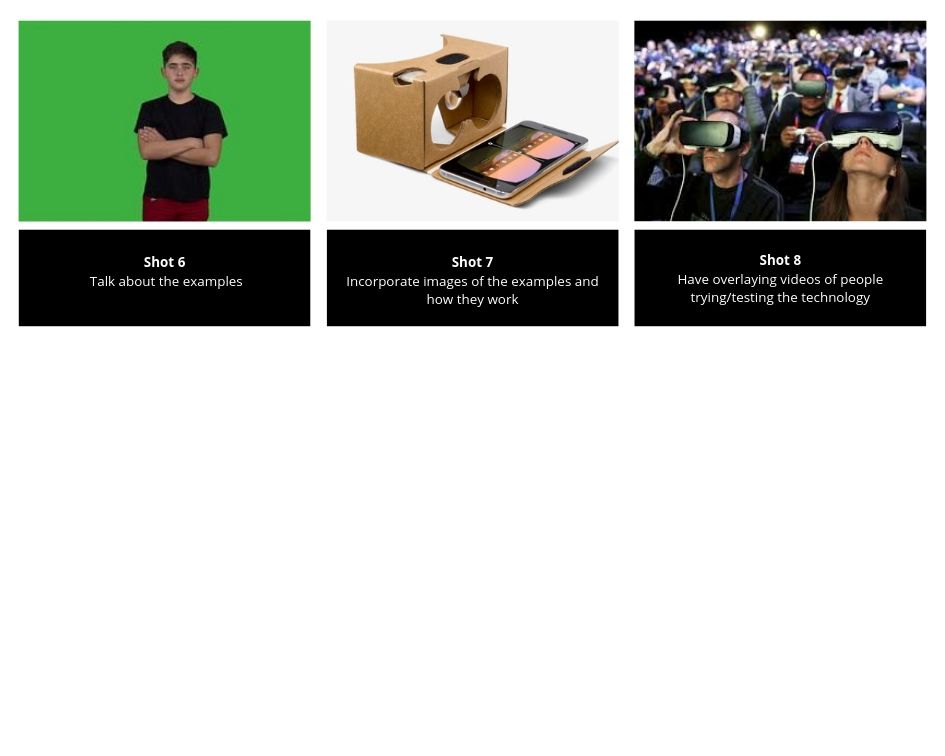
The group has begun to think/brainstorm for more details that could be incorporated throughout some points of the documentary. Some of these include animating graphics in the documentary, or actually demonstrating and teaching the viewer how the device works and including videos, and implementing voice overs.
Next lesson, the group plans to complete the storyboard for the past technology.

 Immersive & Interactive Technology